
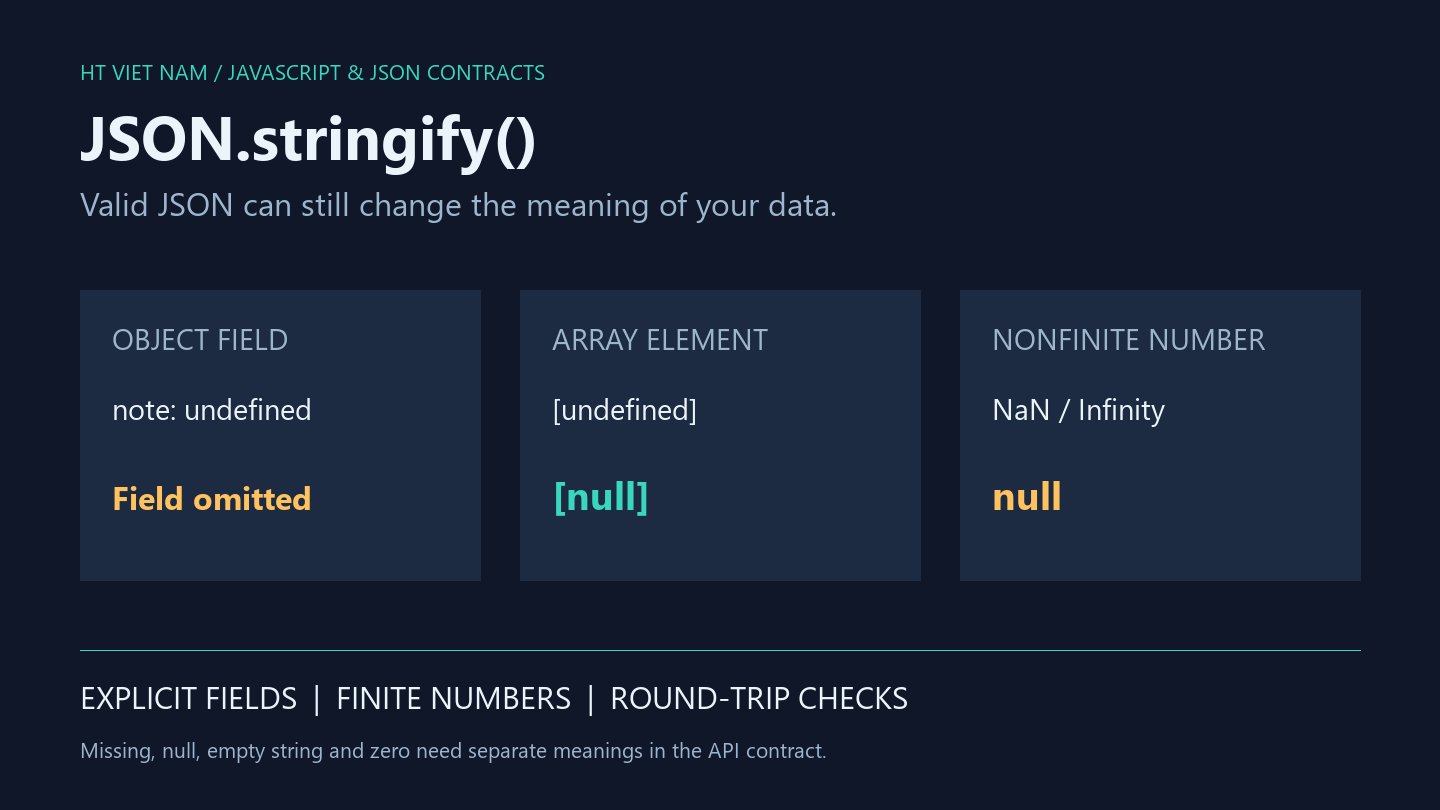
A console object contains note: undefined, but the outgoing JSON has no note field. The same undefined value becomes null inside an array. Understand these serialization rules before treating JSON as a data boundary.
The examples run in memory without requests. Missing fields, null and empty strings acquire business meaning only through a specific API contract.
1. Objects and arrays handle undefined differently
const object = { name: 'Lan', note: undefined };
const array = ['Lan', undefined];

console.log(JSON.stringify(object)); // {"name":"Lan"}
console.log(JSON.stringify(array));  // ["Lan",null]
console.log(JSON.stringify(undefined) === undefined); // true
An undefined-valued object property is omitted. An array element becomes null, preserving its position. At the root, stringify returns JavaScript undefined rather than a JSON string containing that word.
Do not assume the result is always a string. A sending function needs an explicit policy for input that produces no JSON text.
2. Nonfinite numbers become null
const payload = {
  total: NaN,
  maximum: Infinity,
  minimum: -Infinity,
  empty: null
};
console.log(JSON.stringify(payload));
// {"total":null,"maximum":null,"minimum":null,"empty":null}
The receiver cannot infer whether total started as NaN or intentional null from this JSON alone. Reject invalid calculations before serialization when the contract requires a finite number.
Valid JSON does not establish valid data. Successful serialization is insufficient as record validation.
3. Build a small payload explicitly
This illustrative contract requires a finite Number total and a string-or-null note. Null passes through; agree on its meaning with the server.
function buildSummary(total, note) {
  if (typeof total !== 'number' || !Number.isFinite(total)) {
    throw new TypeError('Expected a finite total');
  }
  if (note !== null && typeof note !== 'string') {
    throw new TypeError('Expected text or null for note');
  }
  return { total, note };
}

console.log(JSON.stringify(buildSummary(0, null)));
// {"total":0,"note":null}
console.log(JSON.stringify(buildSummary(12, '')));
// {"total":12,"note":""}
The builder neither replaces NaN with zero nor turns empty strings into null. It selects validated fields rather than serializing an entire UI state object. Negative totals, upper bounds and decimal precision remain separate product decisions.
If an update API distinguishes omission from null-based clearing, model and test them separately. Avoid globally replacing undefined with null without field-specific contract review.
4. A JSON round trip does not preserve every type
const source = {
  createdAt: new Date('2026-01-01T00:00:00Z'),
  note: undefined
};
const restored = JSON.parse(JSON.stringify(source));

console.log(typeof restored.createdAt); // string
console.log(restored.createdAt instanceof Date); // false
console.log(Object.hasOwn(restored, 'note')); // false
An ordinary Date serializes through toJSON as text. Default JSON.parse does not reconstruct a Date, and an omitted note cannot reappear unchanged. This is not a universal type-preserving clone.
Map, Set, BigInt, cycles and custom toJSON methods need deliberate serialization designs. Avoid introducing global conversion behavior to fix one isolated case.
5. Check both sides of serialization
- Verify required fields remain in the final JSON.
- Distinguish omission, null, empty strings and zero.
- Reject nonfinite numbers where finite values are required.
- Test root, object and array undefined values.
- Check restored types after parsing.
- Run backend contract tests for update and clearing semantics.
The snippets ran locally with Node.js, including builder input rejection and round-trip checks. No business API integration or production data update was tested. References: JSON.stringify and JSON.parse.
Treat JSON as an interchange format with defined limits. Explicit payload construction makes omissions and representation changes easier to assess.

No comments yet. Be the first to share your thoughts.