
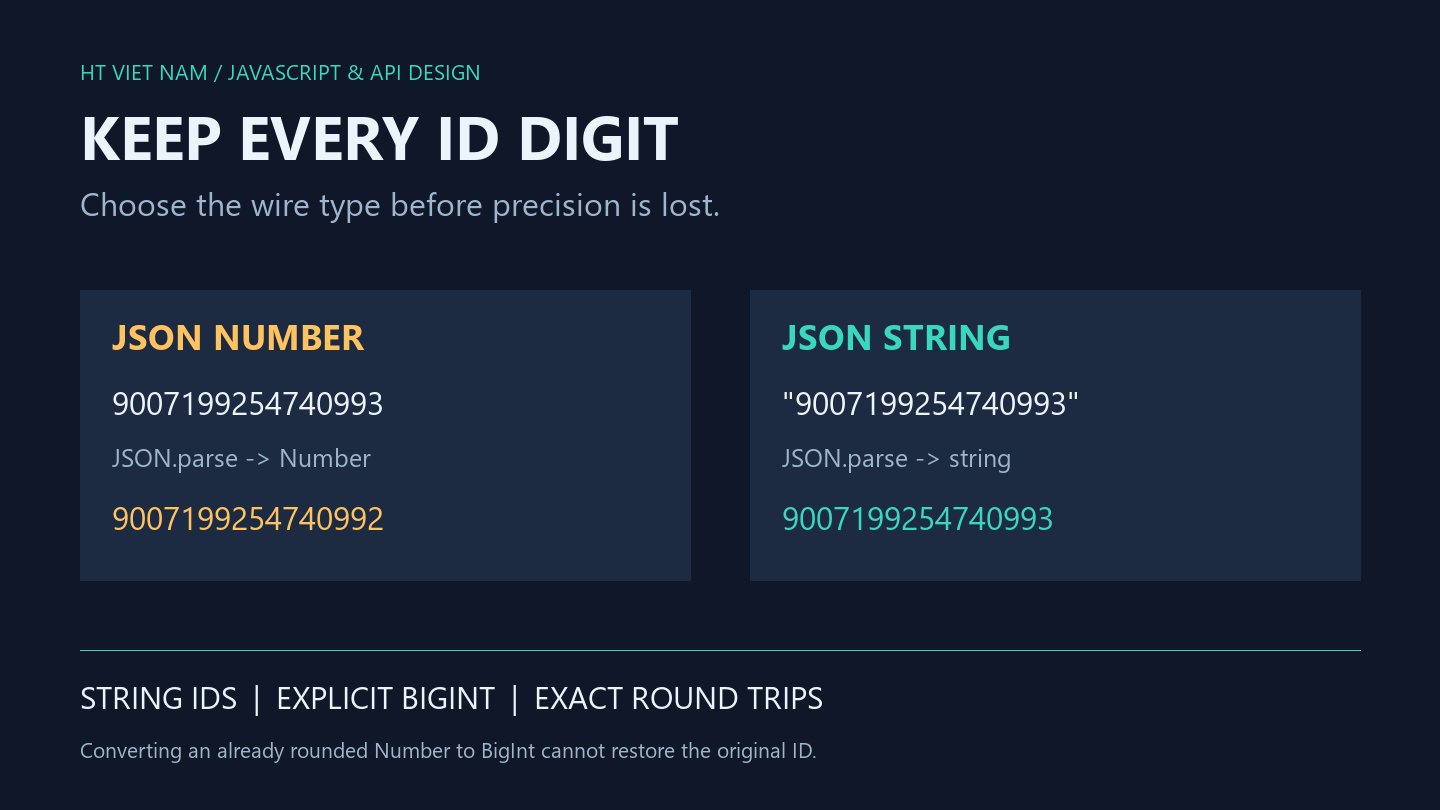
An API returns a long ID, but its last digit changes before the detail page opens. The client may already have rounded it by reading it as a Number. Converting that rounded value to BigInt cannot recover the original digits.
This guide covers large integer IDs crossing JSON boundaries. Identifiers usually need equality and lookup rather than arithmetic, making an end-to-end string contract practical.
1. Representable does not mean safe
const a = Number('9007199254740992');
const b = Number('9007199254740993');

console.log(a === b);                 // true
console.log(Number.MAX_SAFE_INTEGER); // 9007199254740991
console.log(Number.isSafeInteger(a)); // false
MAX_SAFE_INTEGER marks Number's positive safe-integer boundary. Some larger integers remain representable, but consecutive integers are no longer reliably distinguishable. The distinct input IDs above collapse to one value.
Inspect the database column, backend driver, JSON serializer, client state and URL construction. Correct database storage alone does not prove the entire path preserves the value.
2. Valid JSON can still lose precision
const parsed = JSON.parse('{"id":9007199254740993}');
console.log(String(parsed.id));         // 9007199254740992
console.log(String(BigInt(parsed.id))); // 9007199254740992

const exact = JSON.parse('{"id":"9007199254740993"}');
console.log(exact.id);                  // 9007199254740993
console.log(typeof exact.id);           // string
Default JSON.parse produces a Number for this numeric token. Both String and BigInt receive an already rounded value. Neither knows the original digits.
A string-ID API must serialize from an exact backend value. Adding quotes after backend rounding is too late. For external APIs emitting large numeric tokens, use a verified lossless parsing approach on the target runtime or request a contract change.
3. Validate the format while retaining a string
This example defines a positive ASCII decimal ID with no leading zeros and at most 20 digits. This illustrative limit is not a database range guarantee.
function requireId(raw) {
  if (typeof raw !== 'string' || !/^[1-9][0-9]{0,19}$/.test(raw)) {
    throw new TypeError('Expected a canonical positive decimal ID');
  }
  return raw;
}

console.log(requireId('9007199254740993')); // 9007199254740993
The function deliberately avoids trimming and Number-to-string coercion. Adapt the contract if zero, negative values or leading zeros are meaningful. Enforce the actual backend range separately.
Keep validated strings in lookup keys and route parameters. Avoid Number, parseInt and unary plus as ID normalization steps. Format validation also does not replace server-side record authorization.
4. Use BigInt for intentional integer arithmetic
const value = BigInt('9007199254740993');
console.log(String(value + 1n)); // 9007199254740994
console.log(String(5n / 2n));   // 2

try {
  console.log(value + 1);
} catch (error) {
  console.log(error.name); // TypeError
}
Start with an exact string or an n-suffixed literal. This addition requires matching numeric types: 1n and 1 differ. BigInt division truncates the fractional part; it is not an automatic decimal-arithmetic type.
5. Define JSON serialization explicitly
const id = BigInt('9007199254740993');
try {
  JSON.stringify({ id });
} catch (error) {
  console.log(error.name); // TypeError
}

const wire = JSON.stringify({ id: id.toString() });
console.log(wire); // {"id":"9007199254740993"}
In the default environment used here, JSON.stringify does not directly serialize BigInt. Converting the specific id field to a string makes the wire contract explicit. Avoid reviving every digit-only string as BigInt: postal codes and identifiers with leading zeros may require their original text.
6. Test the complete ID journey
- Keep consecutive IDs around the safe boundary distinct.
- Check string types in JSON, state, Map keys and outbound URLs.
- Compare every digit after a round trip, not just string length.
- Reject wrong types, blank text, exponent notation, whitespace and excessive length according to the contract.
- Verify real backend limits and record authorization.
The snippets were executed locally with Node.js. No application-specific production driver or API integration was tested. Further references: BigInt and JSON.parse.
An explicit boundary type prevents silent conversions. For identifiers used only as identifiers, preserving exact strings from source to destination is straightforward to verify.

No comments yet. Be the first to share your thoughts.