
An API returns JSON through curl, but the same URL produces a CORS error in a web application. Both outcomes can be correct: browsers control JavaScript access to cross-origin responses, while curl does not apply the browser's response-reading policy. Fixing the issue starts with identifying which request is blocked and which response lacks permission.
1. An origin is more than a domain name
An origin combines scheme, hostname and port. https://app.example and https://api.example differ, as do http://localhost:3000 and http://localhost:8000. Different paths on the same origin do not themselves require CORS.
CORS headers let a server specify which origins may read responses through a browser. They do not replace authentication, authorization or access restrictions for non-browser clients. See MDN's CORS guide.
2. Separate the actual request from preflight
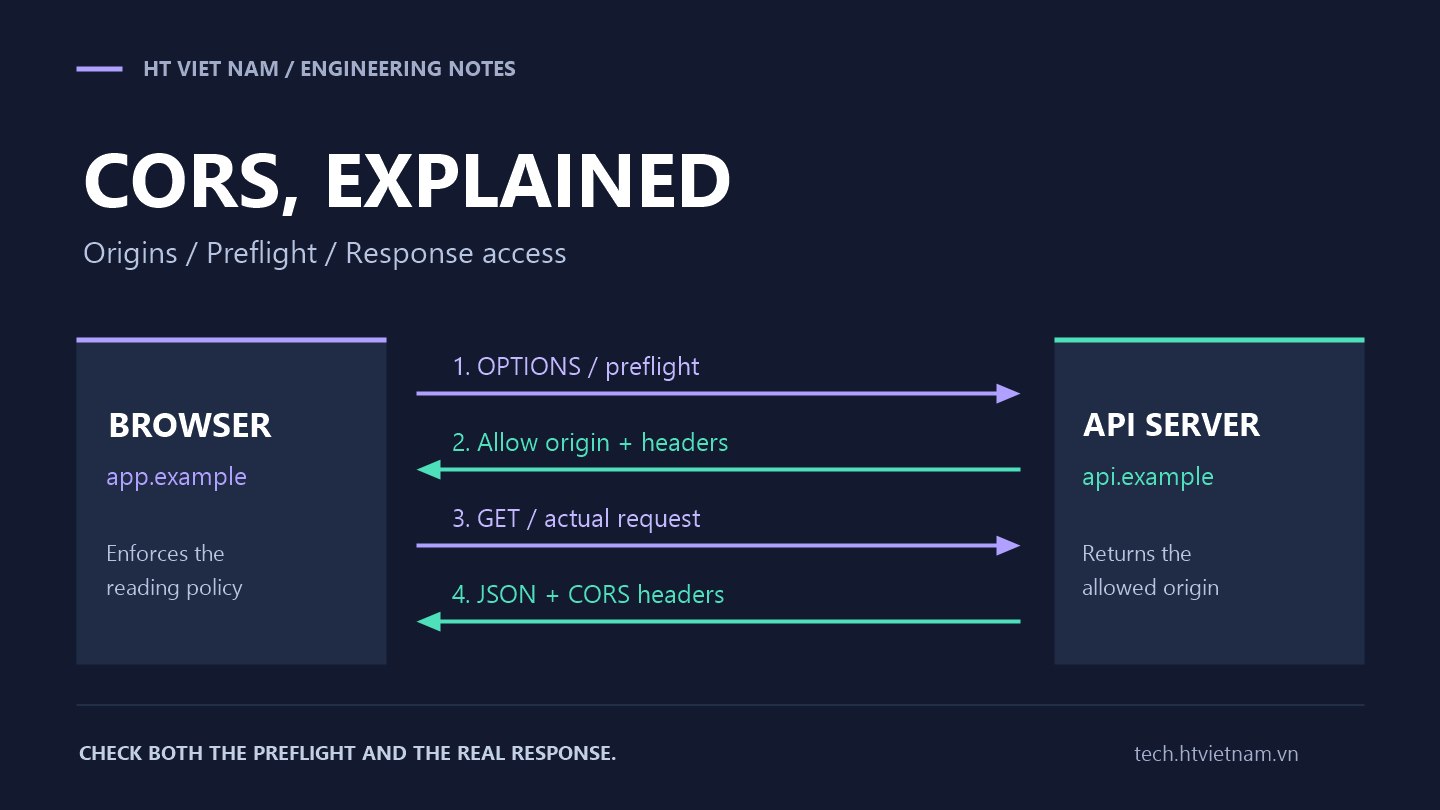
Some requests require an initial OPTIONS exchange to check the intended method and headers. A GET with a custom X-Client-Version header needs preflight unless a suitable cached permission exists. A POST using Content-Type: application/json commonly does too.
Suppose a frontend at https://app.example reads a catalog from https://api.example. This abbreviated exchange is illustrative, not a live endpoint:
OPTIONS /api/catalog HTTP/1.1
Host: api.example
Origin: https://app.example
Access-Control-Request-Method: GET
Access-Control-Request-Headers: x-client-version

HTTP/1.1 204 No Content
Access-Control-Allow-Origin: https://app.example
Access-Control-Allow-Methods: GET
Access-Control-Allow-Headers: X-Client-Version
Vary: Origin
Status 204 alone is insufficient: the headers must permit the requested origin, method and headers. Successful preflight lets the actual request proceed in this case. See the preflight reference.
3. The actual response still needs CORS headers
GET /api/catalog HTTP/1.1
Host: api.example
Origin: https://app.example
X-Client-Version: web-1

HTTP/1.1 200 OK
Content-Type: application/json
Access-Control-Allow-Origin: https://app.example
Vary: Origin

{"items":["Guide","Tutorial"]}
Adding headers only to OPTIONS leaves JavaScript unable to read the GET response. For multiple frontends, validate Origin against an allowlist and return one permitted origin, not a comma-separated list in Access-Control-Allow-Origin.
If the response varies by Origin, use Vary: Origin and check cache/CDN configuration. Never reflect arbitrary origins without validation. See the Allow-Origin reference.
4. Investigate cookies separately
A cross-origin fetch using cookies generally needs credentials: "include". The server must permit credentials and return a specific origin instead of wildcard *:
Access-Control-Allow-Origin: https://app.example
Access-Control-Allow-Credentials: true
Vary: Origin
These headers cannot force cookies to be sent. Domain, path, Secure, SameSite and browser cookie policies still apply. Cross-origin and cross-site are not identical concepts. Ordinary preflight requests do not carry login cookies, so do not require an authenticated session to answer OPTIONS; actual business requests must still be authenticated and authorized. See the credentials reference.
5. Why no-cors is not the fix
Changing fetch to mode: "no-cors" does not grant JSON access. A cross-origin response is generally opaque to JavaScript, so its body and headers cannot be read normally. This mode also restricts methods and request headers. Hiding an error this way removes the data the application needs. See Request.mode.
Disabling browser protections is not a deployment fix either. Correct the server policy or use a same-origin proxy where appropriate for the product architecture.
6. A repeatable debugging procedure
- Record the real origin: use the frontend page's scheme, hostname and port.
- Open Network and Console: look for OPTIONS and inspect its status, redirects and response headers.
- Compare methods and headers: distinguish browser-sent Access-Control-Request-Headers from server-sent Access-Control-Allow-Headers.
- Inspect the actual request: if GET/POST ran but JavaScript cannot read the response, check that response's CORS headers, including error responses.
- Check each infrastructure layer: establish whether the application, reverse proxy or CDN adds headers; avoid duplicated Allow-Origin values.
- Test an origin outside the allowlist: verify that it receives no reading permission and business authorization remains enforced.
To inspect a preflight with curl, substitute a test API you control:
curl -i -X OPTIONS "https://api.example/api/catalog" -H "Origin: https://app.example" -H "Access-Control-Request-Method: GET" -H "Access-Control-Request-Headers: x-client-version"In PowerShell, use curl.exe if needed. This checks headers; it does not demonstrate browser acceptance. Final verification requires calling from the intended frontend and reading the response in the browser.
7. Two easily missed details
To read a custom response header such as X-Request-Id, JavaScript needs the server to expose it with Access-Control-Expose-Headers: X-Request-Id. Allow-Headers permits sending request headers; Expose-Headers permits reading response headers. See the Expose-Headers reference.
Access-Control-Max-Age can reduce preflights by caching permissions, subject to browser-specific limits. Cached permissions may complicate comparisons after configuration changes; a missing OPTIONS request is not automatically an error. See the Max-Age reference.
8. Keep responsibilities distinct
CORS is not complete CSRF protection. Some requests can be sent before the browser decides whether JavaScript may read their responses. State-changing operations need appropriate protection, especially with cookie authentication. See OWASP's CSRF prevention guide.
Record three separate outcomes: whether the server received the request, whether it processed it successfully, and whether JavaScript could read the response. Separating those questions helps frontend and backend teams fix the correct layer instead of adding a wildcard whenever CORS appears.




No comments yet. Be the first to share your thoughts.