
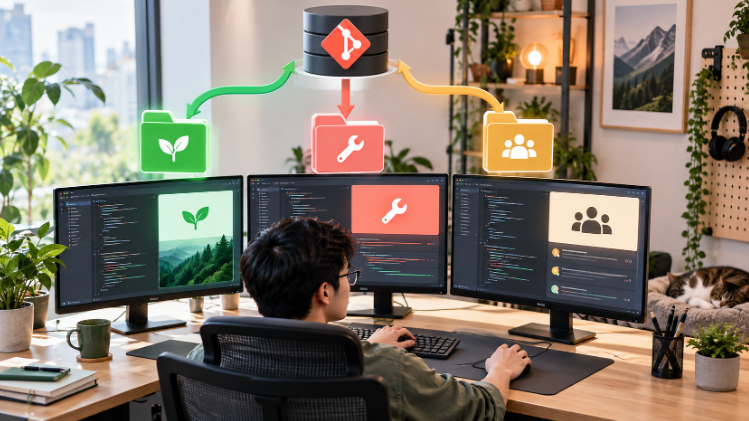
Switching branches is not always convenient. You may be halfway through a feature when an urgent hotfix arrives, or you may need two versions of a project open side by side. Git Worktree solves this by attaching additional working directories to one repository.
What is Git Worktree?
A normal repository has one working tree. With git worktree, the same repository can have several working directories, each checked out to a different branch or commit. Git objects and repository history are shared, while the files in each directory remain independent.
List existing worktrees
git worktree listThe main checkout and every linked worktree are shown with their path, commit, and branch.
Create a worktree with a new branch
git worktree add -b feature/reporting ../project-reporting mainThis creates feature/reporting from main and checks it out in ../project-reporting.
Use an existing branch
git worktree add ../project-hotfix hotfix/loginA branch normally cannot be checked out in two worktrees at the same time. This guard helps prevent conflicting edits.
Create a detached worktree for experiments
git worktree add --detach ../project-test v2.4.0Detached mode is useful for inspecting a release or running a temporary comparison without creating a branch.
Practical example: an urgent hotfix
- Keep the unfinished feature in the current directory.
- Create a worktree from the production branch.
- Fix, test, commit, and push the hotfix in the new directory.
- Remove the worktree and continue the feature without stashing or switching.
git worktree add -b hotfix/payment ../project-payment-hotfix origin/main
cd ../project-payment-hotfix
# edit, test, commit and push
cd ../project
git worktree remove ../project-payment-hotfix
Remove a worktree safely
git worktree remove ../project-reportingGit refuses to remove a worktree with uncommitted changes unless forced. Review those changes rather than treating --force as the default.
Clean stale metadata
If a worktree directory was deleted manually, clean its registration with:
git worktree pruneWhat is shared?
Commits, branches, tags, remotes, and object storage are shared. Working files and the index are separate. Dependencies, build output, environment files, and local databases usually belong to each directory and may need separate installation or unique ports.
When should you use it?
- Handling a hotfix while feature work is unfinished.
- Reviewing a pull request without disturbing the current branch.
- Running two application versions side by side.
- Coordinating parallel tasks or automated coding sessions.


No comments yet. Be the first to share your thoughts.